Iris Coordination
Your entry point. Iris takes the request, proposes which department prepares it and lets you know when there is something to review.


Lynx Virtual Office · by Lynx.studios
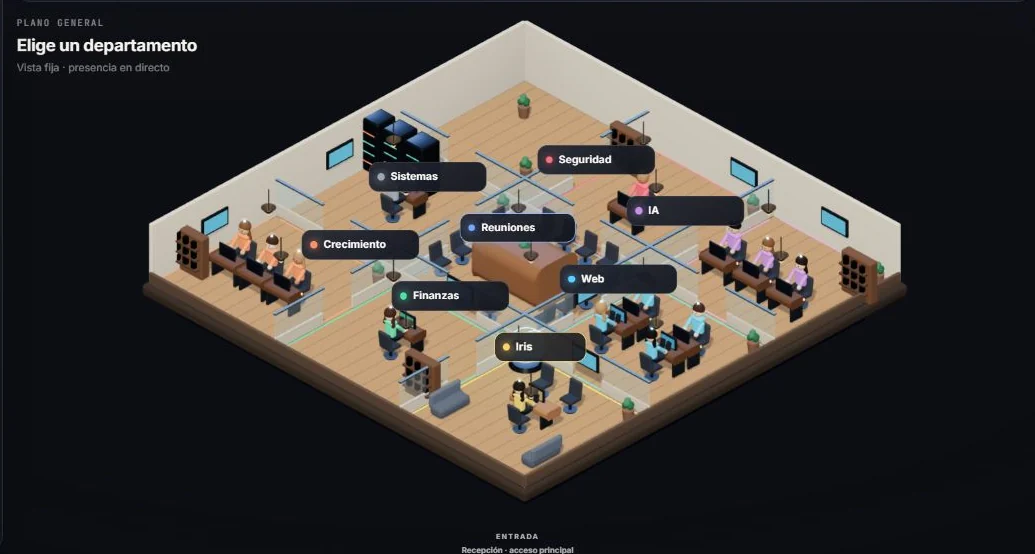
Iris coordinates, the departments we define with you prepare the work, and you review every result before using it. It all happens in a visual office where you can see who is doing what.
Private deployment for each company. Scope, tools and providers are agreed before we start.
Product in active development. The demo distinguishes what is available, what needs a pilot, and what requires implementation.
Use cases
They are examples that show how a request moves through the office. In the demo they run on sample data; using them with your documents or tools requires setting them up and testing them in your deployment.
“Draft a proposal for this client based on what we discussed yesterday.”
Iris splits the request: one profile gathers the client information, another drafts the structure and tone, and the draft comes back to you for review. You decide what gets sent and when.
“Where is the project at, and what is left to close it?”
The office pulls the project’s tasks, activity and notes into a summary: what is done, what is pending and what is blocked. It works as a starting point for a meeting or an internal report.
“Draft a reply to this enquiry using only our terms.”
The draft is prepared from the documents you authorise: terms, catalogues or procedures. Someone on your team checks the reply before it is sent.
How a request works
You tell Iris what you need, in your own words. Iris turns it into a task with an expected deliverable.
The task draws on the company resources you have allowed: documents, guidelines and projects.
Iris assigns the work to the right department. The office shows who has it and what state it is in.
The result arrives as a draft. You approve it, correct it or ask for another version before using it.
Product
The visual office replaces endless lists: every department has its place, and every request has its path.
Lynx Dot for Windows. An optional add-on for leaving requests with Iris from the desktop. Whether it is included depends on availability and on the scope agreed for each deployment.
Your entry point. Iris takes the request, proposes which department prepares it and lets you know when there is something to review.
We define with you the departments and profiles your company needs, with their instructions and way of working.
Each office is set up with its company’s resources: documents, guidelines, data and prepared tools. How data and access are separated is defined in each deployment’s architecture.
Tasks, projects and activity are logged. You can see what was asked, who prepared it and what is waiting for review.
Deployment
It is not an account you open and configure on your own. We prepare your office, test it with your team and adjust it during start-up.
We look at which tasks your team repeats, which documents it works with and where time is lost. We choose where to start.
We create your departments and profiles, load the authorised resources and prepare the agreed tools.
We test each case with real work from your company and review the results with you before day-to-day use.
During start-up we adjust instructions and guidelines based on what your team finds when using it.
We set out in writing which cases are active, with which tools and at what volume of work. Expanding it is your decision.
AI models, connectors and any action on other tools depend on what your company needs and authorises. We explain what is used and why before it is switched on.
Data and control
We explain in concrete terms how your company’s information is handled, including what depends on third parties.
No system is infallible. That is why every result goes through a person before use, and we document the limits of each configuration.
FAQ
The visual office, how Iris receives and assigns a request, and the illustrative walkthroughs on this page with sample data. Then we talk about which of your company’s tasks might fit.
Each deployment has its own budget, based on scope: cases, tools to prepare and support. After the diagnosis you receive a written proposal. There are no self-service plans or payments on the website. More detail in scope and budget.
We start from processes, not industries. If your process needs something specific or is subject to particular regulation, we assess it in the diagnosis and tell you clearly whether we can take it on.
Some connections can be prepared, but each one is agreed, configured and verified in your deployment. A tool appearing in a catalogue does not mean it is connected.
No. The office prepares drafts and someone on your team reviews them before they are used or sent.
Architecture, permissions and providers are agreed in your deployment, and the office only uses the resources you authorise. We explain which providers are involved and what information they receive. See also the privacy policy.
The agency-stage pages are still published as resources: web design, local SEO and automation. Lynx.studios’ main offer is now the private office.
Request a demo