

Product
Inside Lynx Virtual Office
A visual office where every department has its place. Iris receives requests, assigns them and returns drafts for you to review. This page describes the pieces; what is switched on in your company is agreed during deployment.
Request a demo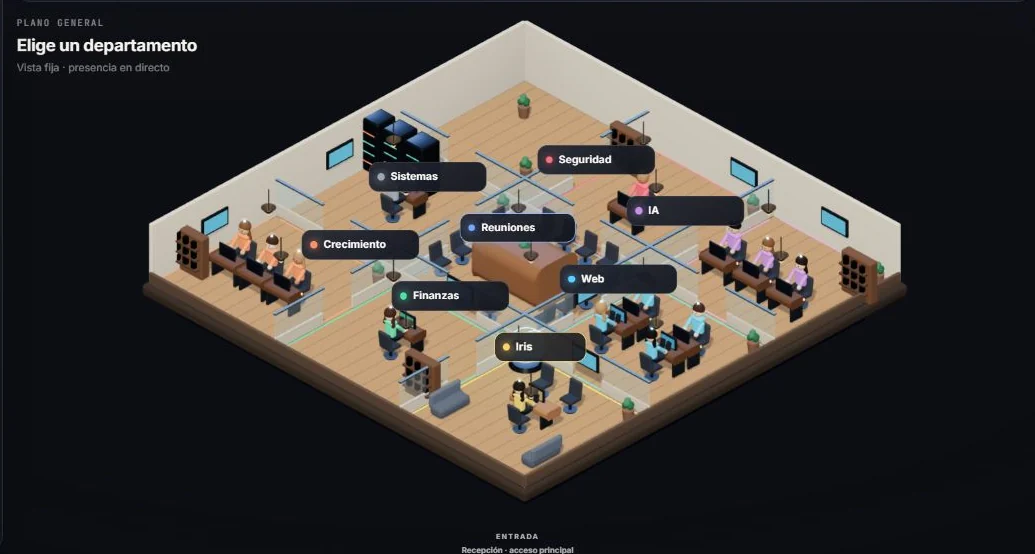
The visual office
Instead of a list of loose chats or tasks, you see a floor plan with departments. Every request has a place, an owner and a status.
The screenshot we show is the internal Lynx.studios office, still in development. Yours is set up with the departments your company needs.
Iris, the coordinator
Iris is the entry point. She takes a request written in your own words, turns it into a task and proposes which department prepares it.
- Takes requests in plain language.
- Assigns work across departments.
- Lets you know when a draft is ready for review.
Departments and profiles
Departments are defined with you: what each one does, which instructions it follows and which resources it works with. There is no fixed structure; the ones in the screenshot belong to our own office.
- Sales
- Customer service
- Operations
- Administration
Context and tracking
Each office is set up with the resources its company authorises: documents, guidelines and prepared tools. How data and access are separated is defined in each deployment’s architecture.
Tasks, projects and activity are logged, so you know what was asked, who prepared it and what still needs review.
Lynx Dot for Windows
An optional add-on for leaving requests with Iris from the desktop without opening the office. Whether it is included depends on availability and on the scope agreed for each deployment.
Can I try it on my own?
There is no self-service sign-up. The way to see it is a demo with sample data; if it fits, we prepare a deployment for your company.
Does the office make decisions for me?
No. It prepares drafts and proposals; decisions and anything sent out are handled by someone on your team.
Request a demo
We’ll show you the office with a sample walkthrough.
- A guided walkthrough of the office with sample data.
- We look at which tasks might fit and which would not, with no commitment.
- If we go ahead, we send you a written scope proposal.